
JDK Distributions Comparison: An Enterprise Guide
For decades, choosing a JDK was not a decision. You downloaded it from Sun, later Oracle, and moved on with your life. Then Oracle changed the licensing terms in 2019, and overnight, “which JDK?” became a question that legal departments cared about. I watched entire organisations panic-migrate to OpenJDK builds they had never tested, simply because someone in procurement flagged a licensing risk. The irony is that the ecosystem that emerged from this disruption is healthier than the monoculture it replaced — more vendors, more options, genuine competition on performance. But navigating it requires understanding not just the technical differences between distributions, but the licensing and support models that surround them.
The JDK Landscape
After Oracle’s licensing changes, the market fragmented into multiple distributions, each with different support models and target audiences. The fragmentation sounds chaotic, but I have come to see it as a net positive — it forced organisations to think deliberately about their runtime, rather than accepting whatever happened to be installed.
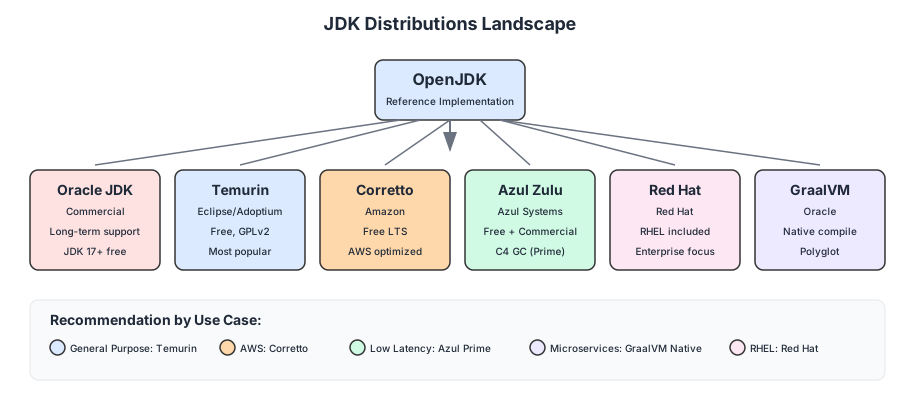
Oracle JDK
The original, now with a commercial licence for production use.
| Aspect | Details |
|---|---|
| Vendor | Oracle |
| License | Commercial (Oracle No-Fee Terms for JDK 17+) |
| Support | Paid, long-term (Premier Support) |
| Best for | Enterprises with Oracle support contracts |
Oracle JDK 17+ is free for production use under the “Oracle No-Fee Terms and Conditions” licence, but earlier versions (8, 11) require a commercial licence for production.
OpenJDK (Adoptium/Eclipse Temurin)
The reference implementation, now stewarded by the Eclipse Foundation.
| Aspect | Details |
|---|---|
| Vendor | Eclipse Foundation (formerly AdoptOpenJDK) |
| License | GPLv2 + Classpath Exception |
| Support | Community + optional commercial |
| Best for | Most production workloads |
Temurin is the go-to choice for most organisations. It’s free, well-tested, and backed by major vendors including Microsoft, Red Hat, and IBM.
Amazon Corretto
Amazon’s production-ready OpenJDK distribution.
| Aspect | Details |
|---|---|
| Vendor | Amazon |
| License | GPLv2 + Classpath Exception |
| Support | Free LTS, AWS support available |
| Best for | AWS-deployed applications |
Corretto includes patches Amazon applies to run their own services. If you’re on AWS, it’s a natural choice with guaranteed long-term support.
Azul Zulu / Azul Prime
Commercial distributions with advanced features.
| Aspect | Details |
|---|---|
| Vendor | Azul Systems |
| License | Commercial (Zulu free tier available) |
| Support | Paid, extensive platform support |
| Best for | Performance-critical applications |
Azul Prime (formerly Zing) includes the C4 garbage collector, offering pauseless GC for latency-sensitive applications.
Red Hat OpenJDK
Enterprise-focused distribution integrated with RHEL.
| Aspect | Details |
|---|---|
| Vendor | Red Hat |
| License | GPLv2 + Classpath Exception |
| Support | Included with RHEL subscription |
| Best for | Red Hat Enterprise Linux environments |
GraalVM
Polyglot VM with ahead-of-time compilation.
| Aspect | Details |
|---|---|
| Vendor | Oracle |
| License | Community (free) / Enterprise (commercial) |
| Support | Community or Oracle support |
| Best for | Microservices, native compilation |
GraalVM’s native-image feature compiles Java to native executables, dramatically reducing startup time and memory footprint—ideal for serverless and containerized deployments.
Garbage Collector Comparison
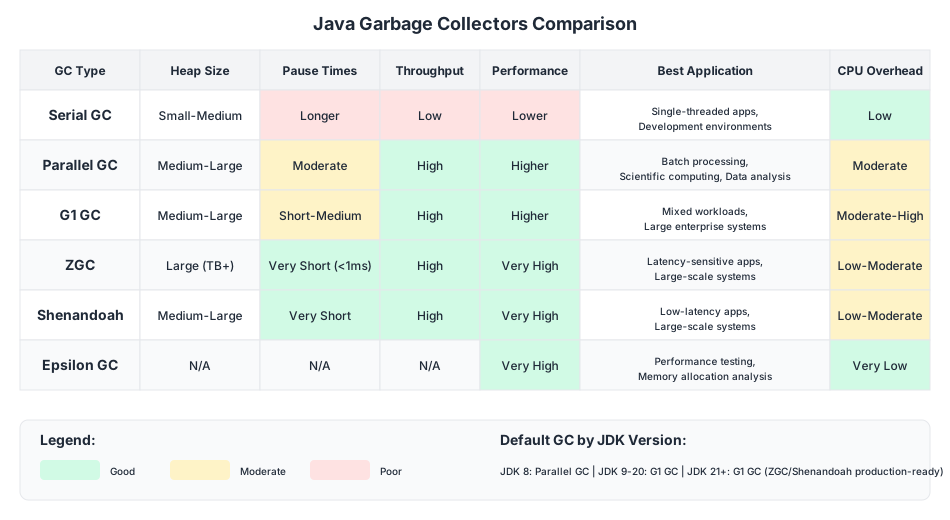
If the JDK distribution is the most over-deliberated decision in enterprise Java, the garbage collector is the most under-deliberated. I have seen teams spend weeks evaluating vendors, then deploy with whatever GC happens to be the default — which is fine for most workloads, but catastrophic for latency-sensitive ones. The choice of garbage collector profoundly impacts application performance, and modern JVMs offer multiple algorithms optimised for different workloads:
Serial GC
The simplest collector, using a single thread.
java -XX:+UseSerialGC -jar app.jar
- Heap Size: Small to medium
- Pause Times: Longer (stop-the-world)
- Throughput: Low
- Use Case: Single-threaded apps, development, small heaps
Parallel GC (Throughput Collector)
Multi-threaded collector optimized for throughput.
java -XX:+UseParallelGC -jar app.jar
- Heap Size: Medium to large
- Pause Times: Moderate
- Throughput: High
- Use Case: Batch processing, scientific computing, data analysis
G1 GC (Garbage First)
The default since JDK 9, balancing throughput and latency.
java -XX:+UseG1GC -XX:MaxGCPauseMillis=200 -jar app.jar
- Heap Size: Medium to large
- Pause Times: Short to medium (target-based)
- Throughput: High
- Use Case: General-purpose, most production workloads
G1 divides the heap into regions and prioritizes collecting regions with the most garbage first—hence the name.
ZGC (Z Garbage Collector)
Ultra-low latency collector introduced in JDK 11.
java -XX:+UseZGC -jar app.jar
- Heap Size: Large (multi-terabyte capable)
- Pause Times: < 1ms (regardless of heap size)
- Throughput: High
- Use Case: Latency-sensitive applications, large heaps
ZGC performs most work concurrently, keeping pause times under a millisecond even with terabyte-sized heaps.
Shenandoah GC
Red Hat’s low-pause collector, similar goals to ZGC.
java -XX:+UseShenandoahGC -jar app.jar
- Heap Size: Medium to large
- Pause Times: Very short
- Throughput: High
- Use Case: Low-latency applications, large-scale systems
Comparison Matrix
| GC | Heap Support | Pause Times | Throughput | CPU Overhead | Best For |
|---|---|---|---|---|---|
| Serial | Small-Medium | Longer | Low | Low | Development, small apps |
| Parallel | Medium-Large | Moderate | High | Moderate | Batch processing |
| G1 | Medium-Large | Short-Medium | High | Moderate-High | General purpose |
| ZGC | Large | < 1ms | High | Low-Moderate | Latency-critical |
| Shenandoah | Medium-Large | Very Short | High | Low-Moderate | Low-latency |
| Epsilon | N/A | N/A | N/A | Very Low | Testing, short-lived apps |
Performance Benchmarks
Real-world performance varies by workload. Here are general observations from our testing:
Throughput Test (Batch Processing)
Processing 10 million records with 8GB heap:
Parallel GC:    45.2 seconds  (baseline)
G1 GC:          48.7 seconds  (+7.7%)
ZGC:            52.1 seconds  (+15.3%)
Shenandoah:     51.4 seconds  (+13.7%)
For pure throughput, Parallel GC still leads.
Latency Test (Web Application)
P99 response times under load (1000 req/sec):
G1 GC:          125ms
ZGC:            12ms
Shenandoah:     15ms
Parallel GC:    890ms (GC pauses)
For latency-sensitive workloads, ZGC and Shenandoah dramatically outperform.
Memory Footprint
Baseline memory usage for a Spring Boot application:
OpenJDK 17:         180MB
GraalVM Native:     45MB
OpenJ9:             140MB
GraalVM native compilation reduces memory by ~75%.
Licensing Considerations
Understanding licensing is crucial for compliance:
Free for Production
- OpenJDK (Temurin): GPLv2 + Classpath Exception
- Amazon Corretto: GPLv2 + Classpath Exception
- Azul Zulu Community: Free tier available
- Oracle JDK 17+: Oracle No-Fee Terms
- Red Hat OpenJDK: With RHEL subscription
- GraalVM Community: GPLv2
Commercial License Required
- Oracle JDK 8/11: Production use requires licence
- Azul Prime: Commercial
- GraalVM Enterprise: Commercial
- IBM Semeru (with support): Commercial
The Classpath Exception
The “Classpath Exception” in OpenJDK’s licence means you can link your proprietary code with OpenJDK without triggering GPL’s copyleft requirements. Your application code remains yours.
Migration Considerations
From Oracle JDK 8 to OpenJDK 17
Key changes to address:
- Removed APIs:
javax.xml.bind,java.activation—add as dependencies - Module System: May need
--add-opensfor reflection - Strong Encapsulation: Internal APIs no longer accessible by default
- Deprecated Features: Nashorn JavaScript engine removed
<!-- Add removed Jakarta EE modules -->
<dependency>
    <groupId>jakarta.xml.bind</groupId>
    <artifactId>jakarta.xml.bind-api</artifactId>
    <version>4.0.0</version>
</dependency>
Testing Your Migration
# Check for compatibility issues
jdeprscan --release 17 your-app.jar

# Check for internal API usage
jdeps --jdk-internals your-app.jar
Recommendations by Use Case
Web Applications (General)
Recommendation: Eclipse Temurin 21 LTS + G1 GC
java -XX:+UseG1GC \
     -XX:MaxGCPauseMillis=200 \
     -Xms2g -Xmx2g \
     -jar app.jar
Latency-Critical (Trading, Real-time)
Recommendation: Azul Prime with C4 GC or OpenJDK 21 + ZGC
java -XX:+UseZGC \
     -Xms8g -Xmx8g \
     -jar trading-app.jar
Microservices / Serverless
Recommendation: GraalVM Native Image
native-image -jar app.jar
./app  # Starts in milliseconds
Batch Processing / Data Pipelines
Recommendation: Eclipse Temurin 21 + Parallel GC
java -XX:+UseParallelGC \
     -XX:ParallelGCThreads=8 \
     -Xms16g -Xmx16g \
     -jar batch-processor.jar
AWS Deployment
Recommendation: Amazon Corretto 21
Native AWS integration, optimized for EC2/ECS/Lambda.
Monitoring GC Performance
Regardless of which GC you choose, monitoring is essential:
# Enable GC logging (JDK 9+)
java -Xlog:gc*:file=gc.log:time,uptime,level,tags \
     -jar app.jar
Key metrics to watch:
- GC Pause Time: How long the application stops
- GC Frequency: How often GC runs
- Heap Usage: Memory consumption patterns
- Allocation Rate: How fast objects are created
Tools for analysis:
- GCViewer: Open-source GC log analyzer
- GCEasy: Online GC log analysis
- JDK Mission Control: Comprehensive profiling
Final Thoughts
The JDK landscape has matured since the Oracle licensing upheaval, and that maturity benefits everyone. If you ask me for a single default recommendation, it is Eclipse Temurin — free, well-tested, backed by serious vendors, and compatible with everything I have thrown at it. For AWS deployments, Corretto is the natural choice. For latency-critical systems, ZGC has changed what is possible without a commercial licence. For microservices that need sub-second cold starts, GraalVM native-image is in a category of its own.
But the real takeaway is simpler than any comparison matrix: benchmark with your actual workload. I have seen GC recommendations from blog posts (including, no doubt, ones like this) lead teams astray because the benchmark conditions did not match production reality. Run your application, under your load profile, with your data, and measure. That is the only recommendation that never goes out of date.
JDK Distributions Comparison: An Enterprise Guide
Navigating the modern Java ecosystem.
Achraf SOLTANI — March 20, 2024